
Tableau Desktop Fundamental (2 วัน)

หลักสูตร สำหรับผู้เริ่มใช้งาน Tableau Desktop โดยในหลักสูตรนี้จะครอบคลุม ฟังก์ชั่นพื้นฐานทั้งหมดของ Tableau Desktop ทั้งการเชื่อมต่อ Data การสร้าง Visualization การปรับแต่งผ่าน User Interface ของโปรแกรมรวมถึงการสร้าง Dashboard และใช้ฟีเจอร์ Story เพื่อเล่าเรื่อง
รายละเอียดหลักสูตร
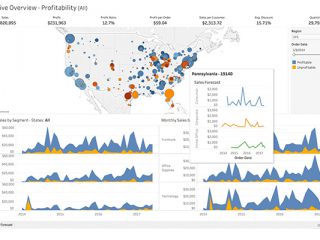
Course Outline
Day 1
- Chapter 1: Introduction to Visual Analytics
- Chapter 2: Getting to Started Tableau Desktop
- Tableau Desktop Step from Start to Finish
- Tableau Worksheet Component
- Chapter 3: Connect to Data and Show Me
- Understand LIVE and EXTRACT connection type
- Connection to Local File and Database
- Knowledge of Chart in Show me
- Chapter 4: Playing with data, Grouping, Sorting and Filtering
- Chapter 5: Dates and Times
- Understand Discrete and Continue Date
- Setting Date Properties and Fiscal Year Start
- Chapter 6: Present the Data Using Table
- Analyze Data Using Table
- Customizing Tables Layout and Data Display
- Chapter 7: Working with Data Graphically
- Creating Chart (with Show me)
- Adding Tooltips in graph
- Chapter 8: Working with Multiple Data Sources
- Knowledge of Relational Database Concept
- Understand and Analyze Data Using Data Blending and Cross Database Join
Day 2
- Chapter 9: Working with Map
- Creating maps to analyze Geographical Data (with Show me)
- Customize the map and Creating Density on a map
- Chapter 10: Multi-Measure Techniques
- Combined Chart. (Two Different Measures)
- Creating Table Display Multi-Measure
- Chapter 11: Basic Statistics
- Highlight Data Using Reference Lines, Bands or Box
- Creating Trend line, Forecast and Moving Average
- Chapter 12: Table Calculation
- Understand and Analyze Data Using Quick Table Calculation
- Chapter 13: Calculating User-defined Fields
- Type of Calculated Fields and Knowledge of Calculation and Aggregation
- Create Calculation Using Functions
- Chapter 14: Dashboard and Story Point
- Create Dashboard and Story
- Action in dashboard e.g. Filter Action, URL Action, Go to Sheet Action
- Chapter 15: Export and Sharing
- Export Your Workbook e.g. Previous Version, Data, Image, PDF, PowerPoint
- Publish Data source, Worksheet and Dashboard to Tableau Server
- Chapter 16: Tableau AI
- Tableau AI Overview
- Introduction to Tableau Pulse
- Data Source Requirements
วิทยากร
ผู้สอนเป็นผู้ได้รับ Certificate จากทาง Tableau หลากหลาย อาทิเช่น
- Tableau Desktop Specialist
- Tableau Certified Associate Consultant (Partner Certification)
สอบถามรายละเอียดเพิ่มเติม
สถานที่อบรม
บริษัท บิสซิเนส แอพพลิเคชั่น จำกัด (BAC)
163 อาคารไทยสมุทร ชั้น 2 ยูนิต C
ถนน สุรวงศ์ แขวง สุริยวงศ์
เขต บางรัก กทม. 10500
(ใกล้ BTS ช่องนนทรี และ MRT สามย่าน)
โทร: 02-634-3737
อีเมล: contact@bac.co.th